Win7批處理優(yōu)化服務(wù)|Win7建服務(wù)項優(yōu)化批處理文件
- 2020-06-04 10:55:03 分類:幫助
系統(tǒng)有不少的服務(wù),但不是每個服務(wù)我們都用得上,有些服務(wù),我們用不上的可以關(guān)閉,但是手動去關(guān)閉會有些麻煩。這篇文章是本站給大家?guī)淼?a href="http://m.kfpaqx.com/soft/windows/3574.html">win7建服務(wù)項優(yōu)化批處理文件方法教程,大家可以參考命令行的寫法,自己進行操作。
方法/步驟:
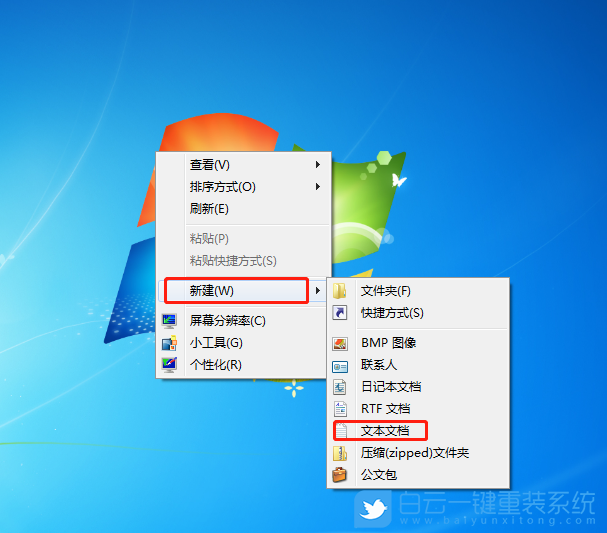
1、右鍵點擊桌面空白處,在打開的菜單項中,選擇新建文本文檔;
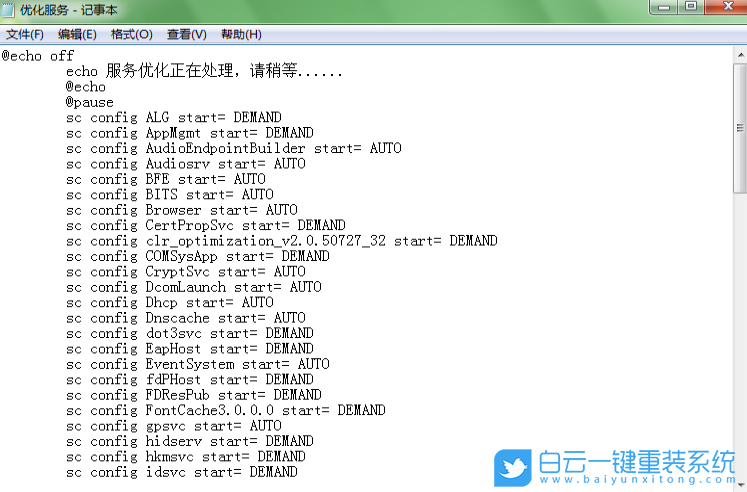
2、復(fù)制粘貼以下代碼到記事本文件中:
@echo off
echo 服務(wù)優(yōu)化正在處理,請稍等......
@echo
@pause
sc config ALG start= DEMAND
sc config AppMgmt start= DEMAND
sc config AudioEndpointBuilder start= AUTO
sc config Audiosrv start= AUTO
sc config BFE start= AUTO
sc config BITS start= AUTO
sc config Browser start= AUTO
sc config CertPropSvc start= DEMAND
sc config clr_optimization_v2.0.50727_32 start= DEMAND
sc config COMSysApp start= DEMAND
sc config CryptSvc start= AUTO
sc config DcomLaunch start= AUTO
sc config Dhcp start= AUTO
sc config Dnscache start= AUTO
sc config dot3svc start= DEMAND
sc config EapHost start= DEMAND
sc config EventSystem start= AUTO
sc config fdPHost start= DEMAND
sc config FDResPub start= DEMAND
sc config FontCache3.0.0.0 start= DEMAND
sc config gpsvc start= AUTO
sc config hidserv start= DEMAND
sc config hkmsvc start= DEMAND
sc config idsvc start= DEMAND
sc config IKEEXT start= AUTO
sc config IPBusEnum start= DEMAND
sc config KeyIso start= DEMAND
sc config LanmanServer start= AUTO
sc config LanmanWorkstation start= AUTO
sc config lltdsvc start= DEMAND
sc config lmhosts start= AUTO
sc config MMCSS start= AUTO
sc config MpsSvc start= AUTO
sc config msiserver start= DEMAND
sc config napagent start= DEMAND
sc config Netlogon start= DEMAND
sc config Netman start= DEMAND
sc config netprofm start= AUTO
sc config NetTcpPortSharing start= DISABLED
sc config NlaSvc start= AUTO
sc config NOD32krn start= AUTO
sc config nsi start= AUTO
sc config PlugPlay start= AUTO
sc config ProfSvc start= AUTO
sc config RasAuto start= DEMAND
sc config RasMan start= DEMAND
sc config RemoteAccess start= DISABLED
sc config RpcLocator start= DEMAND
sc config RpcSs start= AUTO
sc config SamSs start= AUTO
sc config SCardSvr start= DEMAND
sc config SCPolicySvc start= DEMAND
sc config SENS start= AUTO
sc config SharedAccess start= DISABLED
sc config ShellHWDetection start= AUTO
sc config slsvc start= AUTO
sc config SLUINotify start= DEMAND
sc config SNMPTRAP start= DEMAND
sc config SSDPSRV start= DEMAND
sc config SstpSvc start= DEMAND
sc config SysMain start= AUTO
sc config TapiSrv start= DEMAND
sc config TBS start= AUTO
sc config Themes start= AUTO
sc config THREADORDER start= DEMAND
sc config TrustedInstaller start= DEMAND
sc config upnphost start= DEMAND
sc config UxSms start= AUTO
sc config vds start= DEMAND
sc config W32Time start= AUTO
sc config wcncsvc start= DEMAND
sc config WcsPlugInService start= DEMAND
sc config WinHttpAutoProxySvc start= DEMAND
sc config Winmgmt start= AUTO
sc config Wlansvc start= DEMAND
sc config wmiApSrv start= DEMAND
sc config WMPNetworkSvc start= DEMAND
sc config wscsvc start= AUTO
sc config wuauserv start= AUTO
sc config wudfsvc start= DEMAND
@pause
echo.
echo.&echo 優(yōu)化完成!任意鍵退出
echo. & pause>nul
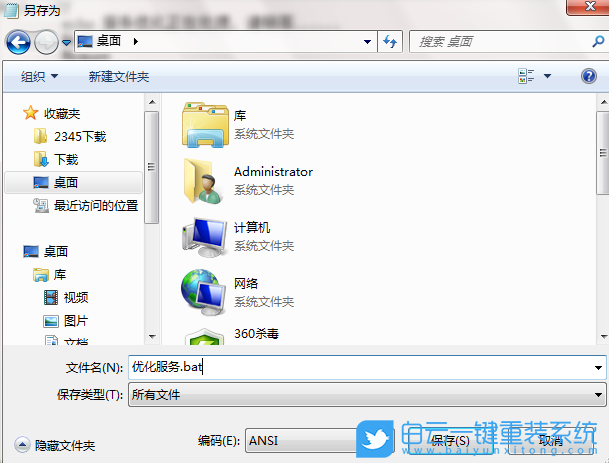
3、另存為的時候,注意文件名要后綴帶有 .bat 的文件;
所用命令意思:
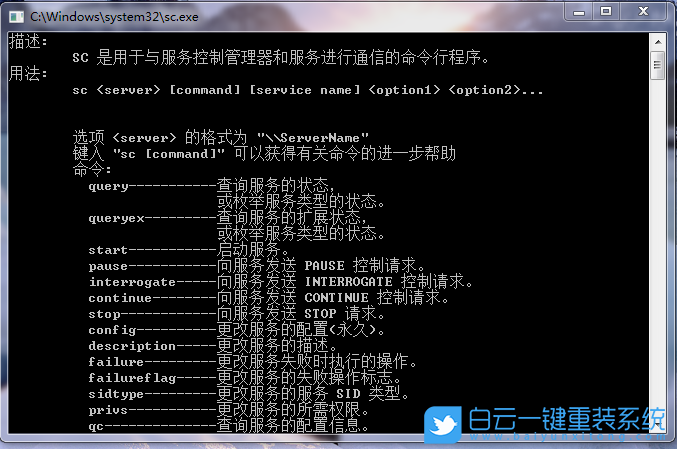
SC 用于啟動服務(wù)控制 器的命令行程序
config 命令參數(shù),意思是永久更改服務(wù)配置,說白了就是將服務(wù)項設(shè)置為"自動,手動,禁用"
后面跟的就是服務(wù)名稱了
"="號后的就是"自動,手動,禁用",AUTO - 自動,DEMAND - 手動,DISABLED - 禁用
此時批處理文件已經(jīng)制作完成,大家可以雙擊打開該文件執(zhí)行。以上就是Win7批處理優(yōu)化服務(wù)|Win7建服務(wù)項優(yōu)化批處理文件文章,如果這篇文章的方法能幫到你,那就收藏白云一鍵重裝系統(tǒng)網(wǎng)站,在這里會不定期給大家分享常用裝機故障解決方法。

Win7批處理優(yōu)化服務(wù)|Win7建服務(wù)項優(yōu)化批處理文件相關(guān)教程
- Windows系統(tǒng)如何設(shè)置主題自動更換|自動更換主題設(shè)
- Win10注冊表如何解決亮度被鎖定|亮度被鎖定的解
- Win7如何取消屏幕鍵盤|關(guān)閉屏幕鍵盤的方法
- Windows如何設(shè)置鍵盤布局|鍵盤布局的設(shè)置方法
- Win7系統(tǒng)WMI服務(wù)如何禁用|WMI服務(wù)的禁用方法
- Win7怎么清理系統(tǒng)日志|清理Win7系統(tǒng)日志的方法
- Win11如何開啟速覽功能|速覽功能的開啟方法
- Win7如何解決屏幕亮度被鎖定|亮度被鎖定的解決方
- Win10怎么設(shè)置壁紙自動更換|設(shè)置自動更換壁紙的

Win10系統(tǒng)發(fā)布者不受信任怎么辦,如何解決有用戶反映說,在使用win10系統(tǒng)時,想要打開某些程序,卻提示發(fā)布者并不被信任,提示說為了對計算機進行保護已經(jīng)阻止此

恢復(fù)win10系統(tǒng)源文件命令有哪些|Dism命令使用教程電腦隨著使用時間的變長,而變得更加容易出現(xiàn)一些問題,比如因為源文件出現(xiàn)變化,就容易導(dǎo)致電腦的資源管理器出現(xiàn)卡頓