Win11 Powershell 查看Windows監(jiān)聽端口占用
- 2023-07-12 11:34:35 分類:幫助
Get-NetTCPConnection cmdlet 是 PowerShell 中與 Netstat 命令相對應(yīng)的命令。它能夠查看與 Netstat 類似的信息。您可以使用 Get-NetTCPConnection 命令輸出以下信息:
-本地地址
-本地端口
-遠(yuǎn)程地址
-遠(yuǎn)程端口
-狀態(tài)
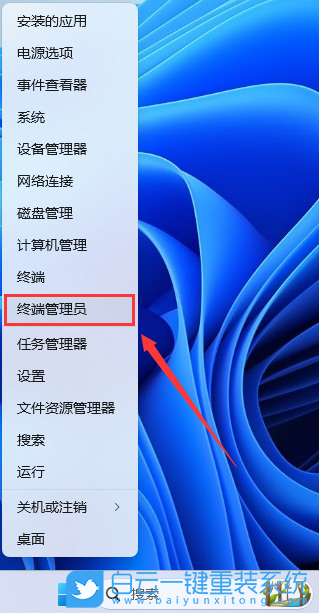
1、按鍵盤上的【 Win + X 】組合鍵,或右鍵點擊任務(wù)欄上的【W(wǎng)indows開始徽標(biāo)】,在打開的隱藏菜單項中,選擇【終端管理員】;
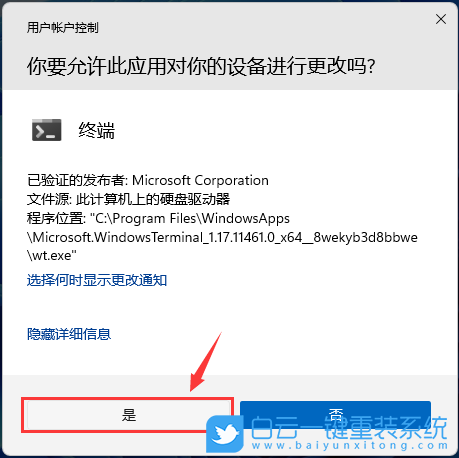
2、用戶賬戶控制窗口,你要允許此應(yīng)用對你的設(shè)備進行更改嗎?點擊【是】;
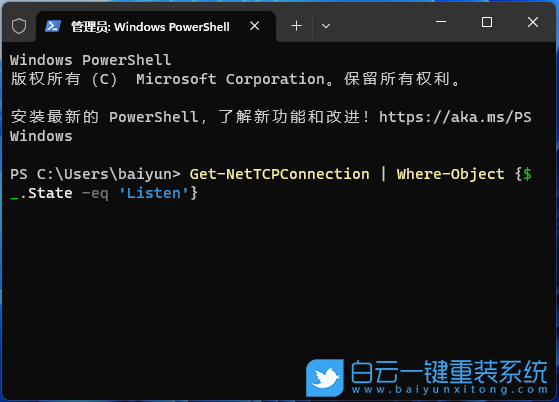
3、可以使用 Where-Object 過濾器對輸出內(nèi)容進行篩選,它類似于 findstr 命令:
Get-NetTCPConnection | Where-Object {$_.State -eq 'Listen'}
4、還可以使用 -State 參數(shù)按狀態(tài)篩選連接列表:
Get-NetTCPConnection -State Listen
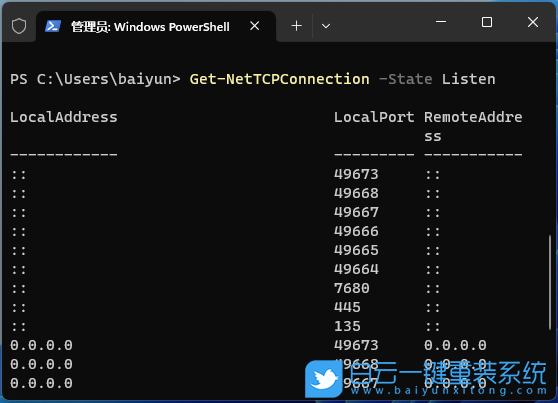
這將顯示所有處于【監(jiān)聽】狀態(tài)的端口。
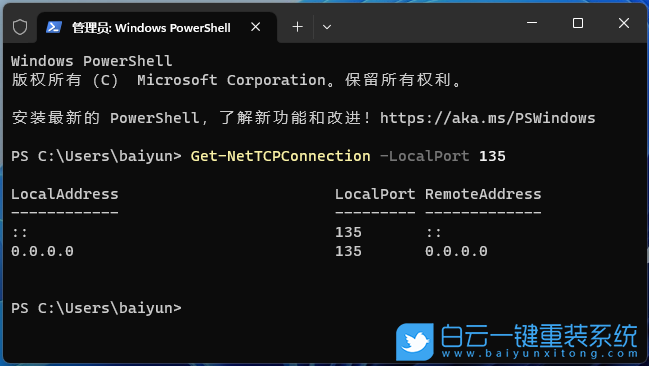
5、也可以使用端口號來應(yīng)用篩選器:
Get-NetTCPConnection -LocalPort 135
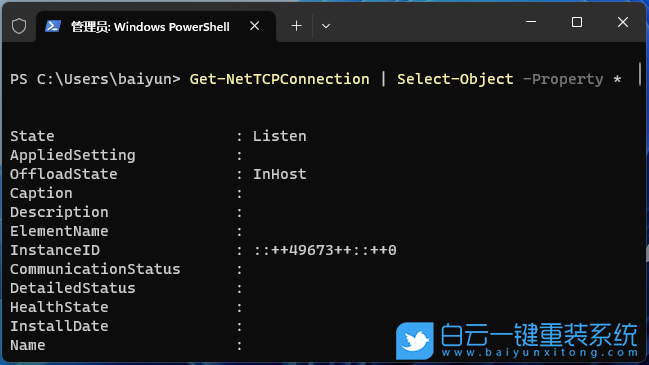
6、可以運行以下命令以獲取每個連接的詳細(xì)信息:
Get-NetTCPConnection | Select-Object -Property *
以上就是Win11 Powershell 查看Windows監(jiān)聽端口占用文章,如果這篇文章的方法能幫到你,那就收藏白云一鍵重裝系統(tǒng)網(wǎng)站,在這里會不定期給大家分享常用裝機故障解決方法。
-本地地址
-本地端口
-遠(yuǎn)程地址
-遠(yuǎn)程端口
-狀態(tài)
1、按鍵盤上的【 Win + X 】組合鍵,或右鍵點擊任務(wù)欄上的【W(wǎng)indows開始徽標(biāo)】,在打開的隱藏菜單項中,選擇【終端管理員】;
2、用戶賬戶控制窗口,你要允許此應(yīng)用對你的設(shè)備進行更改嗎?點擊【是】;
3、可以使用 Where-Object 過濾器對輸出內(nèi)容進行篩選,它類似于 findstr 命令:
Get-NetTCPConnection | Where-Object {$_.State -eq 'Listen'}
4、還可以使用 -State 參數(shù)按狀態(tài)篩選連接列表:
Get-NetTCPConnection -State Listen
這將顯示所有處于【監(jiān)聽】狀態(tài)的端口。
5、也可以使用端口號來應(yīng)用篩選器:
Get-NetTCPConnection -LocalPort 135
6、可以運行以下命令以獲取每個連接的詳細(xì)信息:
Get-NetTCPConnection | Select-Object -Property *
以上就是Win11 Powershell 查看Windows監(jiān)聽端口占用文章,如果這篇文章的方法能幫到你,那就收藏白云一鍵重裝系統(tǒng)網(wǎng)站,在這里會不定期給大家分享常用裝機故障解決方法。

Win11 Powershell 查看Windows監(jiān)聽端口占用相關(guān)教程
- Windows系統(tǒng)如何設(shè)置主題自動更換|自動更換主題設(shè)
- Win10注冊表如何解決亮度被鎖定|亮度被鎖定的解
- Win7如何取消屏幕鍵盤|關(guān)閉屏幕鍵盤的方法
- Windows如何設(shè)置鍵盤布局|鍵盤布局的設(shè)置方法
- Win7系統(tǒng)WMI服務(wù)如何禁用|WMI服務(wù)的禁用方法
- Win7怎么清理系統(tǒng)日志|清理Win7系統(tǒng)日志的方法
- Win11如何開啟速覽功能|速覽功能的開啟方法
- Win7如何解決屏幕亮度被鎖定|亮度被鎖定的解決方
- Win10怎么設(shè)置壁紙自動更換|設(shè)置自動更換壁紙的

Win10系統(tǒng)發(fā)布者不受信任怎么辦,如何解決有用戶反映說,在使用win10系統(tǒng)時,想要打開某些程序,卻提示發(fā)布者并不被信任,提示說為了對計算機進行保護已經(jīng)阻止此

恢復(fù)win10系統(tǒng)源文件命令有哪些|Dism命令使用教程電腦隨著使用時間的變長,而變得更加容易出現(xiàn)一些問題,比如因為源文件出現(xiàn)變化,就容易導(dǎo)致電腦的資源管理器出現(xiàn)卡頓